The fiber vs copper cabling decision in a data center comes down to three factors: how far the link runs, what speed it must support, and what medium (copper category or fiber type) fits that run. Copper is simpler and cheaper for short, fixed-speed links, while fiber carries signals farther and resists electrical noise. This guide walks through each cabling type and gives a practical path for server access, in-row, row-to-row and backbone links.
What Counts as Fiber and What Counts as Copper in a Data Center
Copper cabling in a data center generally means twisted-pair systems built to TIA-568.2-D, including Cat6, Cat6A and Cat8. These carry both data and, in some cases, power over balanced copper pairs. Fiber cabling, covered under TIA-568.3-D, uses glass strands to carry light signals and comes in two families: multimode (OM3, OM4, OM5) and single-mode (OS2). Multimode fiber uses a larger core for shorter, lower-cost links, while single-mode fiber uses a narrower core built for long-distance transmission. Knowing which family a link belongs to is the first step before comparing speed or distance.
The Copper Channel Length Limit
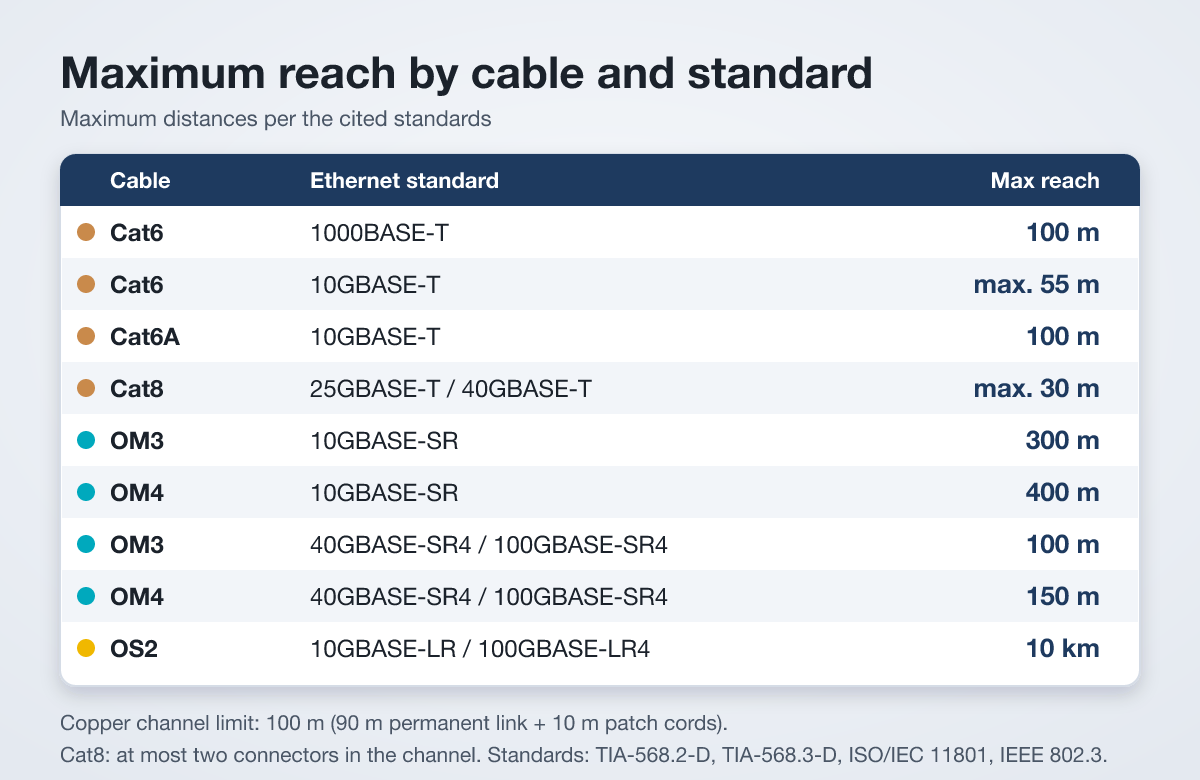
Every copper channel under TIA-568.2-D and ISO/IEC 11801 is capped at 100 m total, made up of a 90 m permanent link plus up to 10 m of total patch cords at each end. This limit applies regardless of category, so Cat6, Cat6A and Cat8 all share the same 100 m horizontal ceiling. What changes between categories is not reach but how much bandwidth and which IEEE 802.3 speed standard the channel can support within that distance. This is why copper is the default for short, fixed-length runs rather than long backbone paths. For full details on cable types, see the guide to structured cabling types.
Cat6 vs Cat6A vs Cat8
Cat6 supports up to 250 MHz and runs 1000BASE-T at the full 100 m channel length, but 10GBASE-T over Cat6 is limited to short distances, at most 55 m depending on the environment. Cat6A doubles the bandwidth to 500 MHz and supports 10GBASE-T at the full 100 m, making it the practical choice when 10GBASE-T is needed end to end. Cat8 reaches up to 2000 MHz and supports 25GBASE-T and 40GBASE-T, but only over short channels of at most 30 m with at most two connectors. That makes Cat8 suited to short server-to-switch links such as in-cabinet or end-of-row connections, not general horizontal cabling.
Multimode vs Single-Mode
Multimode fiber (OM3, OM4, OM5) uses a 50/125 µm core and cladding, sized for shorter, higher-loss-tolerant links within a data hall. Single-mode fiber (OS2) uses a much narrower 9/125 µm core, which lets light travel with less dispersion over much longer distances. Multimode is generally the lower-cost choice for in-building fiber runs, while single-mode is the choice once a link needs to leave the building or span a large campus. Neither copper nor fiber is affected equally by environment: fiber is immune to electrical noise and electromagnetic interference, which matters near heavy power equipment.
OM3, OM4, OM5 and Their Reach
Under 10GBASE-SR, OM3 reaches 300 m and OM4 reaches 400 m, giving both plenty of headroom for in-row and row-to-row links. At higher speeds under 40GBASE-SR4 and 100GBASE-SR4, reach drops to 100 m on OM3 and 150 m on OM4, since higher-speed optics are more sensitive to signal loss over distance. OM5 is a wideband multimode fiber built to support multi-wavelength transmission (SWDM), and its standard SR distances match OM4. In practice, OM4 and OM5 are the safer picks when a facility expects speed upgrades later, since they hold more reach at higher speeds than OM3.
OS2 for Long Links
Single-mode OS2 fiber is the standard choice once a link needs to go beyond what multimode can reliably support. Under 10GBASE-LR, OS2 reaches 10 km, and under 100GBASE-LR4 it also reaches 10 km, making it suitable for campus backbones, long inter-building runs and carrier entry links. Because OS2 supports such long spans at multiple speeds, it is often installed even when current needs are shorter, simply to future-proof the backbone. The tradeoff is that single-mode optics are typically costlier than multimode optics for the same port, so OS2 is reserved for links that actually need the reach.
How to Choose by Distance, Speed and Environment (a Decision Path)
Start with the link type. For server access links inside a single cabinet or to an adjacent switch, Cat6A or Cat8 usually fits, since 10GBASE-T, 25GBASE-T or 40GBASE-T over short copper channels covers most needs. For in-row links, where runs stay under 100 m but need 10GBASE-T speeds, Cat6A is the practical copper option, while OM3 or OM4 fiber suits 10GBASE-SR or faster optical links. For row-to-row links that stretch closer to or beyond copper’s 100 m ceiling, multimode fiber (OM3, OM4 or OM5) is the better fit. For backbone links between rooms, floors or buildings, OS2 single-mode fiber is the standard answer given its 10 km reach under 10GBASE-LR and 100GBASE-LR4. Review the full data center cabling product range when planning a mixed copper and fiber design.
Installation and Labeling Notes (Jacket Colors)
Consistent jacket coloring helps technicians identify fiber type at a glance during installation and moves, adds or changes. OM3 and OM4 cables use an aqua jacket, OM5 uses lime green, and OS2 single-mode cable uses yellow. Keeping these colors consistent across a facility avoids cross-connecting multimode and single-mode fiber, which will not work reliably due to their different core sizes. Labeling at both ends of every link, copper or fiber, also speeds up troubleshooting and reduces the chance of patching the wrong channel.
Common Mistakes
A frequent mistake is assuming all copper categories reach 100 m at every speed, when Cat6 only reaches 10GBASE-T over much shorter distances. Another is exceeding Cat8’s two-connector, 30 m channel limit by adding extra patch panels, which breaks the supported speed. On the fiber side, mixing OM3 with OM4 or OS2 in the same link, or ignoring jacket color coding, leads to mismatched connections and wasted troubleshooting time. Finally, some designs use single-mode fiber everywhere out of caution, adding cost on short links where multimode would perform the same job for less.
Summary and Internal Links
Choosing between fiber and copper comes down to matching distance and required speed to the right medium: Cat6A or Cat8 for short server links, multimode fiber for in-row and row-to-row runs, and OS2 single-mode fiber for backbone links. Always check the IEEE 802.3 speed standard against the channel length before finalizing a design. For deeper guidance, browse the data center cabling resources or learn more about what makes up a data center.
Need a quote on this?
Send the load, the capacity and the delivery country. A priced quote comes back within 48 hours.
Request a Quote