A switched PDU is a rack power distribution unit that allows administrators to remotely turn individual outlets on, off, or reboot them over a network connection, without anyone needing physical access to the rack. Unlike a basic power strip, it gives IT and facilities teams granular control over which devices receive power at any given moment. This makes it a core tool for remote data centers, colocation cabinets, and edge sites where a technician cannot always be on-site. Because downtime often costs far more than hardware, the ability to reboot a frozen server or isolate a faulty device from a browser or management platform has become a standard requirement in modern rack design.
What Is a Switched PDU
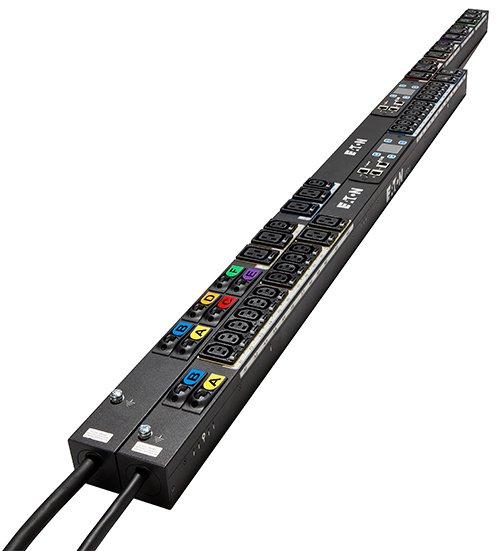
A switched PDU is essentially a power distribution unit with built-in intelligence at the outlet level. Each outlet, or a bank of outlets, can be switched independently through a web interface, command line, or integration with data center infrastructure management software. This differs from a basic PDU, which only distributes power with no remote control, and from a metered PDU, which reports power usage but cannot switch outlets. The switched PDU combines distribution with control, which is why it sits in a higher tier of rack PDU functionality. In practical terms, this means a facility manager in another city can power-cycle a hung switch or server without dispatching anyone to the site.
How a Switched PDU Works
Internally, a switched PDU contains relays or solid-state switches tied to each outlet or outlet group, controlled by an onboard microcontroller. That controller connects to the network through an Ethernet port, allowing access via a web dashboard, SNMP, or API calls from monitoring software. When an administrator sends a command to power off an outlet, the controller triggers the relay, cutting power to that specific connection while leaving the rest of the unit untouched. Many units also log switching events and current draw per outlet, which helps with troubleshooting and capacity planning. This outlet-level independence is the key functional difference that separates switched models from simpler distribution strips.
Where Switched PDUs Are Used
Switched PDUs are common in colocation facilities where tenants need remote hands capability without paying for an on-site visit every time a server needs a reboot. They are also used in edge computing locations, such as retail back rooms or regional network closets, where staff presence is minimal. Enterprise data centers use them in server racks and network racks to support staged power-up sequences and to isolate problem devices during maintenance windows. Managed service providers frequently deploy switched PDUs across client sites specifically so they can perform remote reboots as part of their support contracts. In any environment where downtime is expensive and physical access is limited or costly, a switched PDU earns its place quickly.
Selection Criteria for a Switched PDU
Choosing the right switched PDU starts with matching outlet count and outlet type to the equipment it will support, since mismatched connectors create unnecessary adapters and clutter. Input voltage and phase, single-phase or three-phase, must align with the facility’s electrical distribution, and total rack load should be calculated before selecting a current rating. Form factor matters too, with vertical zero-U units saving horizontal rack space in dense cabinets, while horizontal 1U or 2U units suit racks with lighter device counts. Network management features, including support for SNMP, HTTPS access, and integration with existing monitoring tools, should be confirmed against what the IT team already uses. Redundancy needs also influence the decision, since many racks pair two switched PDUs with dual-corded servers for A/B power redundancy.
Technical Specifications to Review
When comparing switched PDU options, review the outlet configuration, including the mix of standard and high-current outlet types available on the unit. Input connector type and cord length affect how the unit connects to upstream power sources such as a UPS output or a panel circuit. Mounting style, whether vertical or horizontal, and physical rack unit height determine how it fits into the planned rack layout. Management interface details, such as whether control is through a dedicated LAN port, serial console, or both, affect how it integrates into existing network segmentation. Always confirm the maximum rated current and voltage against the actual connected load rather than assuming headroom.
Installation and Field Notes
During installation, mount the switched PDU vertically along the rear rails of the cabinet for zero-U models, or horizontally in a dedicated rack unit slot for 1U and 2U models, keeping cable runs organized to avoid blocking airflow. Assign a static IP address or reserved DHCP lease to the management port so the unit remains reachable even after a network change. Label each outlet clearly in the management interface with the connected device name, since this single step saves significant time during emergency reboots. Test outlet switching during a planned maintenance window before relying on it during an actual incident, confirming that each labeled outlet actually controls the intended device. Many field technicians also recommend documenting the PDU’s management IP and credentials in the site runbook so remote teams are not locked out during a crisis.
Common Mistakes to Avoid
One frequent mistake is leaving the management interface on default credentials, which creates a security exposure on networks that are reachable remotely. Another is mislabeling outlets or skipping labeling altogether, which turns a simple remote reboot into a guessing game during an outage. Overloading a single switched PDU by connecting more devices than its rated current allows is another common error, often discovered only when a breaker trips under load. Some teams also forget to plan for redundant power paths, placing both power supplies of a critical server on the same switched PDU, which defeats the purpose of dual-corded redundancy. Finally, failing to segment the PDU’s management network from general traffic can expose outlet-level control to unnecessary risk.
Maintenance Considerations
Routine maintenance for a switched PDU includes periodically verifying firmware is current, since manufacturers release updates for security patches and interface improvements. Physical inspections should check that outlet connections are seated firmly and that cooling vents, where present, are not obstructed by cable bundles. Reviewing logged switching events and load history helps identify unusual patterns, such as a device drawing more current than expected before it fails outright. It is also good practice to re-verify outlet labeling after any rack reconfiguration, since swapped connections without updated labels can cause confusion during the next incident response. Scheduling an annual review of user accounts and access permissions on the management interface further reduces long-term security risk.
Cost and Budget Considerations
Switched PDUs cost more than basic or metered PDUs because of the added relay hardware and network management components, so budget planning should weigh how much remote control value is actually needed per rack. For racks with critical, hard-to-access equipment, the added cost is typically justified by reduced truck rolls and faster incident response. For less critical racks or those with frequent on-site staff presence, a metered or basic PDU may be sufficient, reserving switched units for the racks where remote control delivers the clearest return. It is also worth considering that outlet-level metering, often bundled with switching, adds visibility that can help right-size future power purchases and avoid over-provisioning circuits.
A switched PDU gives data center and IT teams precise, remote control over rack-level power, reducing the need for on-site visits and improving response time during outages. Understanding how it differs from basic and metered PDUs helps teams choose the right level of control for each rack rather than overspending or underprotecting critical equipment. For a closer look at available rack PDU options and configurations, visit DataCenterPort’s rack PDU page.
Need a quote on this?
Send the load, the capacity and the delivery country. A priced quote comes back within 48 hours.
Request a Quote