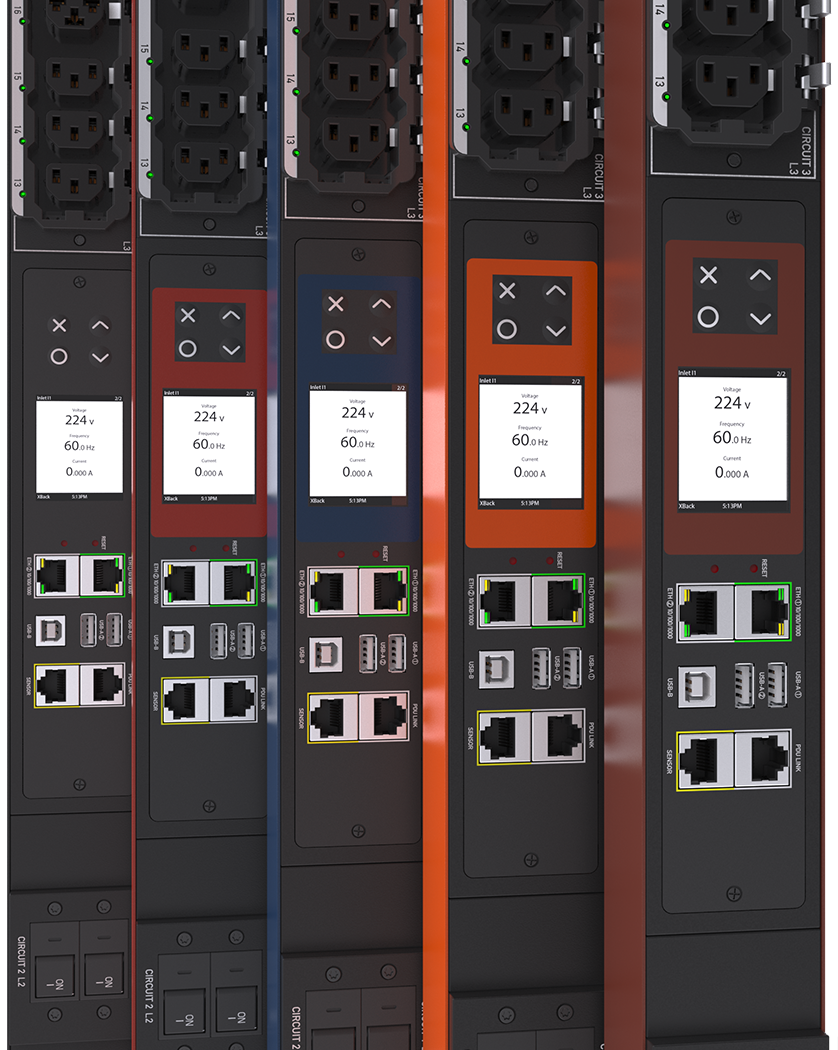
A switched PDU is a rack-mounted power distribution unit that allows administrators to remotely turn individual outlets on, off, or reboot them over a network connection. Unlike basic power strips, it gives IT and facilities teams outlet-level control and visibility without walking to the server room. This makes it a core tool for remote hands operations, especially in colocation facilities and multi-site deployments. It typically includes an IP interface, onboard metering, and support for standard network management protocols. Because it blends power delivery with remote management, it sits at the intersection of electrical infrastructure and IT operations.
What a Switched PDU Actually Is
At its core, a switched PDU is an intelligent power strip built for 19-inch rack cabinets. It distributes utility or UPS power to connected devices through a series of outlets, but each outlet (or groups of outlets) can be switched independently. This differs from a basic PDU, which only distributes power with no remote control, and from a metered PDU, which only reports usage without switching ability. A switched PDU usually sits in the rear of a rack cabinet, mounted vertically or horizontally depending on available space. It is designed to be a permanent part of the rack’s power path, not a temporary accessory.
How a Switched PDU Works
Internally, a switched PDU uses relays or solid-state switches tied to each outlet or outlet bank, controlled by an onboard microcontroller. This controller connects to the network through an Ethernet port, allowing access via a web interface, command line, or SNMP. When an administrator sends a command to power-cycle a port, the controller triggers the relay to cut and restore power on that specific outlet. Many units also include current and voltage sensors that feed real-time data back to the management interface. This closed loop of control and monitoring is what separates switched models from simpler power strips.
Where Switched PDUs Are Used
Switched PDUs are common in data centers, network closets, colocation cages, and remote edge sites where physical access is limited or costly. A colocation provider might deploy them so that a customer’s IT staff, sitting in another city, can reboot a frozen server without dispatching a technician. In edge computing locations such as retail back rooms or telecom cabinets, a switched PDU lets a central NOC team manage power without an on-site visit. They are also used in lab and test environments where equipment needs scheduled or scripted power cycling. Any environment where downtime from a stuck device is costly benefits from this remote-control layer.
Selection Criteria for a Switched PDU
Choosing the right unit starts with matching voltage, phase, and plug type to the facility’s electrical service and the rack’s power budget. Outlet count and form factor matter too since a dense rack with many low-draw devices needs a different outlet layout than a rack with few high-draw servers. Mounting orientation, either 0U vertical or horizontal units that consume rack space, should match the cabinet’s available room. Network management features, including support for SNMP, HTTPS, and integration with existing DCIM platforms, should be checked against the facility’s monitoring stack. Redundancy needs also play a role, since many racks use dual switched PDUs fed from separate power sources for an A/B feed setup.
Technical Specifications to Review
Typical specification sheets for switched PDUs list input voltage range, maximum amperage, outlet count and type (such as C13 or C19), and the plug or hardwire termination on the input side. Management specifications usually cover supported protocols like SNMP v1/v2/v3, HTTP/HTTPS, SSH, and Modbus for integration with building management systems. Some units specify per-outlet metering accuracy, environmental sensor ports for temperature and humidity probes, and alarm thresholds for overcurrent conditions. Mechanical details include unit height in rack units, mounting bracket type, and cable management accessories. Always confirm these details against the manufacturer’s datasheet rather than assuming parity between similar-looking models.
Installation and Field Notes
During installation, label every outlet clearly and document which connected device sits on each port before the rack gets busy with cabling. It’s good practice to assign static IP addresses to switched PDUs rather than relying on DHCP, since losing network access to a power control device during a network outage defeats its purpose. Route the network management cable separately from heavy power cables where possible to reduce interference and simplify troubleshooting. When installing dual PDUs for redundancy, verify that each unit is fed from a genuinely independent power source, not just a different breaker on the same panel. Field technicians often test outlet switching before loading the rack with production equipment, confirming that each port responds correctly to remote commands.
Common Mistakes to Avoid
One frequent mistake is undersizing the PDU for future growth, leaving no spare outlets when new equipment arrives. Another is neglecting firmware updates, which can leave the management interface exposed to known vulnerabilities over time. Teams sometimes forget to set strong, unique passwords on the PDU’s web interface, treating it as a low-priority device despite its network connectivity. Mixing up outlet group assignments during installation is also common, leading to confusion when a reboot command affects the wrong device. Finally, some installations skip proper labeling, which turns a simple remote reboot into a guessing game during an incident.
Maintenance Practices
Routine maintenance for a switched PDU includes periodic firmware updates to patch security issues and add feature improvements. Visual inspections should check for loose outlet connections, worn cables, or signs of overheating around high-draw ports. Reviewing historical power and environmental logs helps catch gradual trends, such as a rack’s current draw creeping upward as equipment is added. It’s also worth testing failover behavior for dual-PDU setups periodically, confirming that losing one input source doesn’t interrupt power to connected devices. Keeping a record of firmware versions, IP assignments, and configuration backups makes recovery faster if a unit ever needs replacement.
Cost and Budget Considerations
A switched PDU costs more than a basic or metered PDU because of the added electronics, network interface, and switching hardware inside each unit. That added cost buys remote control capability that can reduce the need for on-site technician visits, which is often the real savings over the unit’s lifetime. Facilities with multiple remote sites or after-hours support needs tend to see the fastest payback, since avoided truck rolls add up quickly. On the other hand, a single rack in an easily accessible office server room may not need the switching feature at all, making a simpler metered or basic PDU a more reasonable budget choice. The right decision depends on balancing how often remote power cycling will actually be used against the premium paid for that capability.
Switched PDUs give data center and IT teams a practical way to manage rack power remotely, reducing downtime and site visits while adding valuable monitoring data. Choosing the right model depends on outlet count, mounting style, network features, and how critical remote control is for a given site. For a closer look at available rack PDU options and specifications, visit DataCenterPort’s Rack PDU page.
Need a quote on this?
Send the load, the capacity and the delivery country. A priced quote comes back within 48 hours.
Request a Quote